AI Study Assistant

Paired with world-class, trusted OUP content, the Oxford Insight AI Study Assistant is designed to deliver reliable and pedagogically sound support to students while offering transparency that fosters deeper classroom engagement and underpins academic integrity.

AI Study Assistant

Paired with world-class, trusted OUP content, the Oxford Insight AI Study Assistant is designed to deliver reliable and pedagogically sound support to students while offering transparency that fosters deeper classroom engagement and underpins academic integrity.

Screenshot of the AI Study Assistant interface as seen from the Student View

AI Study Assistant Features Overview

The Oxford Insight AI Study Assistant is built with the same foundation of trust, responsible innovation, and dedication to academic excellent you expect from OUP. By using the AI Study Assistant, students can easily access the power of a sophisticated large language model (LLM) to boost their study experience and learn the course material more quickly and effectively all in one place.

User-Friendly Interface

Without leaving the Oxford Insight platform, the AI Study Assistant gives students the keys to take control of their study experience. The easy-to-use AI Study Assistant interface is seamlessly incorporated into Oxford Insight and can be moved or resized based on user needs.

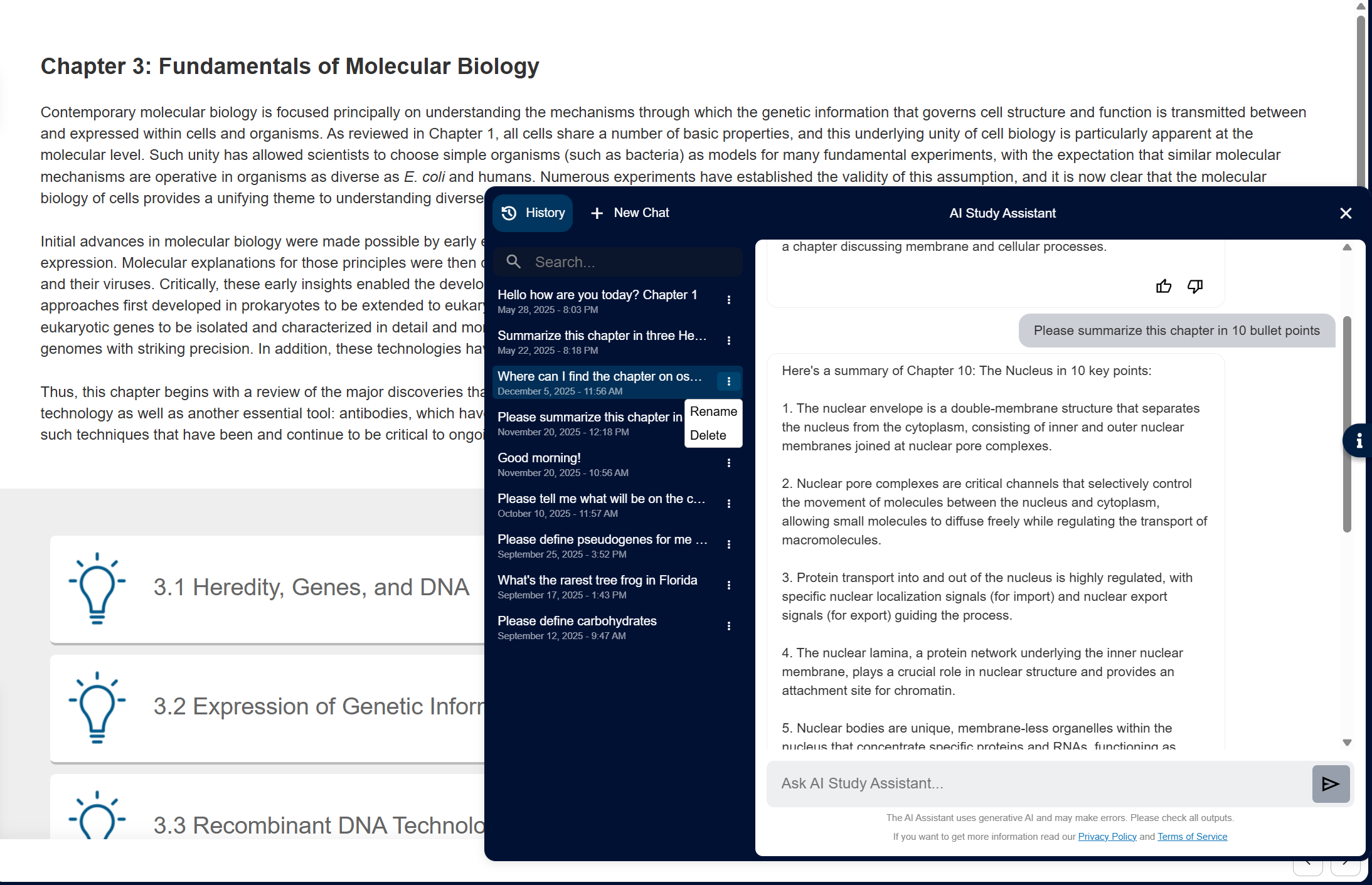
Screenshot of Oxford Insight showing the AI Study Assistant interface with the chat History area opened on the left

Trusted Source Content

All responses provided by the AI Study Assistant are based on the high-quality, trusted, and gated OUP course content that instructors know, ensuring that students receive accurate information. Responses to queries include references to specific text sections with the current chapter prioritized in formulating responses, ensuring close correspondence between the query and material being reviewed. And any inappropriate queries are politely redirected.
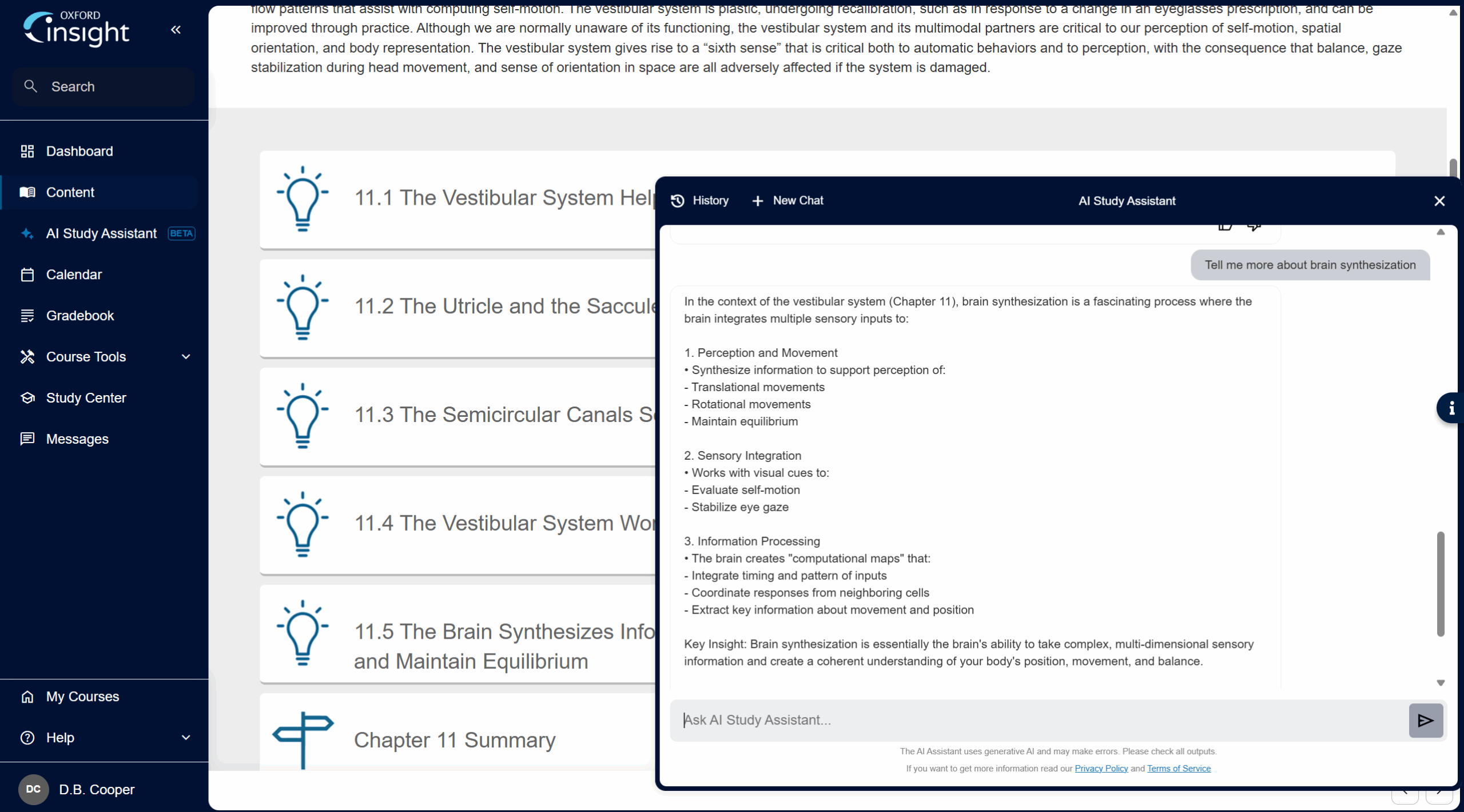
Screenshot of the Oxford Insight AI Study Assistant answering a prompt from a student and referencing the specific chapter of the course title

Custom Queries

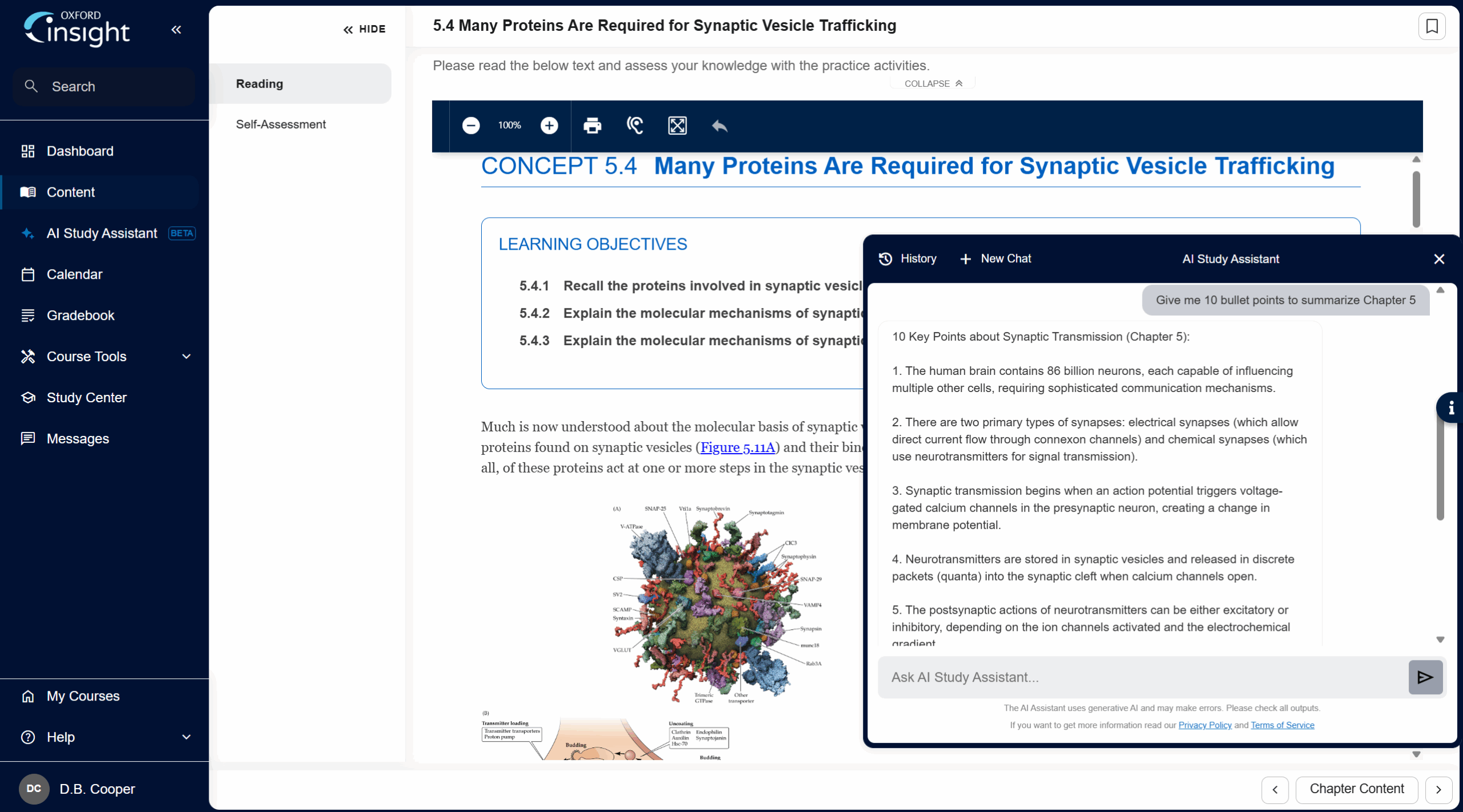
Alongside the e-book, activities, and assessments in Oxford Insight, the AI Study Assistant offers students a personalized tool to search for explanations of key terms and concepts, generate custom study guides, or ask questions to deepen their understanding of complex concepts. Students can choose to use sample prompts or type in their own to enlist the AI Study Assistant and cater responses to their individual learning preferences. Terms and concepts that can have multiple meanings are properly interpreted in the correct context for the course material. Customized practice questions can be generated, taken, and scored. Students can then request the AI Study Assistant direct them back to the text for the concepts that require further review.

Screenshot of the AI Study Assistant interface as seen from the Student View

Chat History & Reports

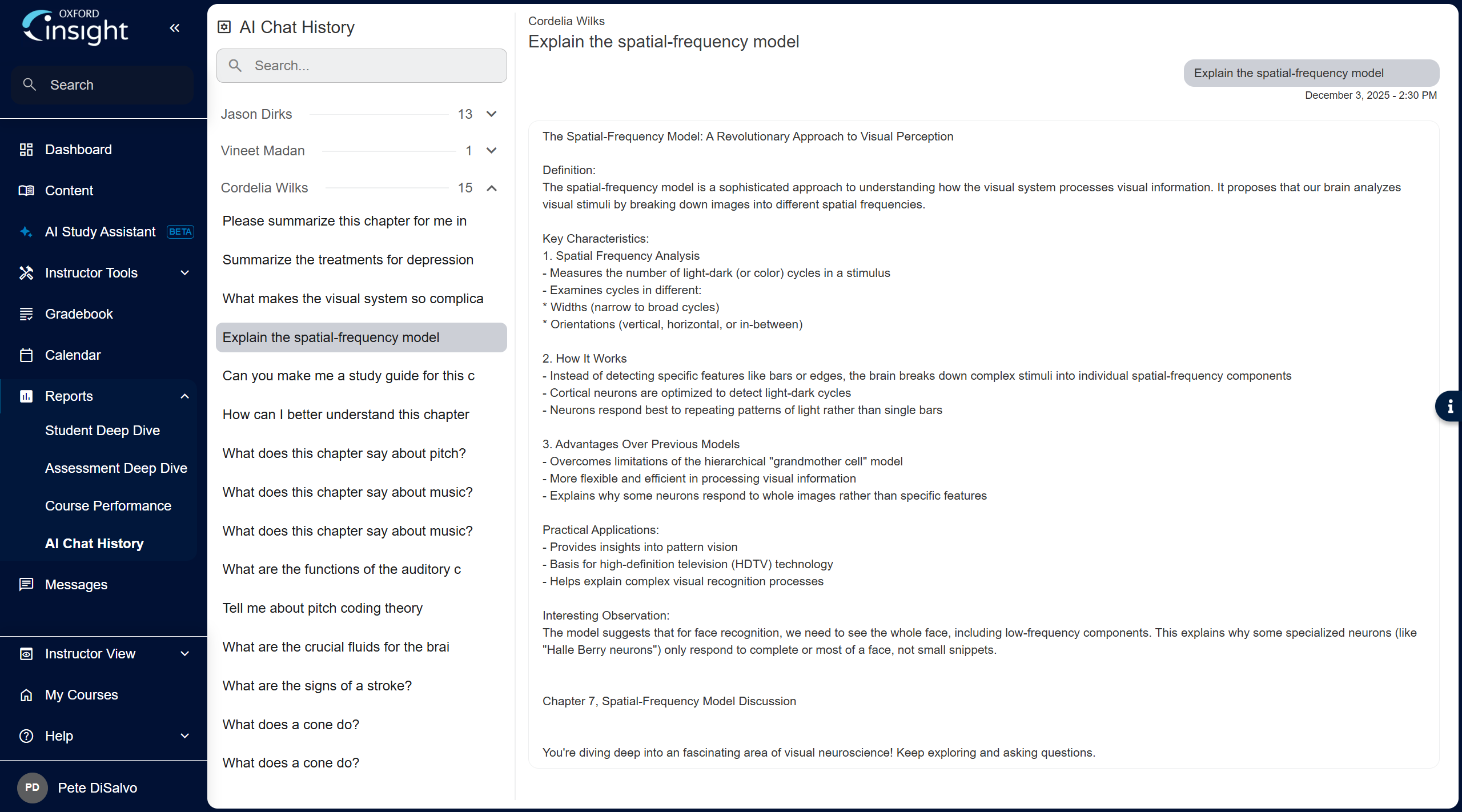
Students can pull up their own previous searches in a chat history, and rename each chat for easy organization. Instructors also have oversight and can review a chat history report of each student’s interactions with the AI Study Assistant to ensure appropriate and ethical use, increasing accountability and aligning with individual classroom and institutional guidelines.

Screenshot of Oxford Insight AI Chat History report for instructors


Frequently Asked Questions


General Information

The AI Study Assistant (included in all Oxford Insight courses) will help increase students’ efficiency when studying by helping them to engage with relevant content from their course text.

Input a query, and the Study Assistant will rapidly generate a concise, useful response based on the content within your Oxford Insight title. Each generated response contains a reference pointing to the source material in the text, so you can quickly find out more. Everything entered into the tool is secure, and you can be confident that you are accessing authoritative content.

As with any generative AI tool, hallucinations remain possible, so it’s good practice to make checks against original content. The reference that accompanies each response will help students to do this by pointing them to the source material in the text.

Please note: Oxford Insight’s AI Study Assistant’s answers and any questions it generates are designed to be limited to the topics covered by the title in your course.

You can use one of the suggested prompts at the top of each new chat session or enter your own question.

The ‘Summary’ prompt is useful for getting a concise overview of a topic or section of the text.

The ‘Question’ prompt will generate questions for you, to help you test your knowledge of the course material. The AI Study Assistant will check what topic or chapter you would like to test yourself on before a study question is generated. If requested, it will then give you feedback on your answers, so that you can understand why you were right or wrong. The feedback will include text references, so you know where to go to read more.

Enter your own free-form question on any aspect of the course material to learn more about a topic or concept.

As with any AI-generated content, it’s important to make checks against original content. The reference that accompanies each generated response will help you to do this.

The Oxford Insight AI Study Assistant is currently built on Anthropic’s state-of-the-art Claude large language model (LLM). As LLMs evolve, we will upgrade or change the model when necessary, to take advantage of advances in LLM functionality and performance.

Once you submit a query, the AI Study Assistant first finds relevant information from your OUP text and then uses that information to create its response. Every answer is based on the original text and includes a reference, so you can validate the information and practice responsible use of AI tools.

No, Oxford Insight’s AI Study Assistant does not search the wider internet/web.

Our goal is to give you access to the knowledge that will expand your capabilities. All responses are solely grounded in the trusted Oxford University Press title in your course.

The AI Study Assistant is available in almost all Oxford Insight courses.

Some universities have policies that prohibit the use of any AI tools by their students, and some instructors may not wish to use the AI Study Assistant in their courses. If you are a student at one of these institutions, or in such a course, it’s possible that access may have been disabled. If you have any questions about your university’s policies regarding the use of AI tools, please contact your instructor.

The AI Study Assistant is located on the left-hand menu in most Oxford Insight courses, just below the ‘Content’ menu item.

Some universities have policies that prohibit the use of any AI by their students, and some instructors may not wish to use the AI Study Assistant in their courses. If you are a student at one of these institutions, or in such a course, it’s possible that you may not be able to access the AI Study Assistant.

Oxford Insight’s AI Study Assistant is easy for anyone to use, regardless of experience. No training in its use is necessary. Once you have accessed the AI Study Assistant, just type in your query/question/prompt, and it will provide a response that addresses your query. You can then ask follow-up questions for more detail or to clarify your intent, for example “Could you explain that in more detail?”

To help you get started, here are some tips:

  • Be specific: Clearly state the topic that you are interested in.
  • Break down complex queries: If your query is complex, consider breaking it down into smaller, more manageable prompts. This can help the Assistant provide more accurate and detailed responses.
  • Stay Organized: Click ‘+ New Chat.’ This will create a fresh conversation, allowing you to switch to another topic more easily. You can even rename each chat if you wish.

We have designed a tool meant to help students understand the course material and to learn.

The AI Study Assistant is intended to help you accelerate towards your learning goals more efficiently by providing a starting point from which you can explore relevant content in your Oxford Insight course. As with any generative AI tool, hallucinations remain possible, so it’s good practice to make checks against original content. Reviewing the references accompanying each result will help you accomplish this.

We recognize there are concerns about AI’s energy demands within the technology industry, and it’s something we continue to monitor. That includes working with our suppliers and partners to understand what they are doing to minimize their environmental impact.

Our commitment to achieve net zero by 2050 encompasses tackling the footprint of our digital products. We will continue to evolve our strategy to ensure we are addressing the areas that have the biggest impact on our operations.

No. We have been mindful of the need for the ethical use of AI, so the AI Study Assistant’s responses are limited in length to approximately 350 words; this is done intentionally to prevent the generation of essays or assignments. The responses are long enough to act as a foundation and to provide signposts for further engagement with the content available in Oxford Insight.

User Experience

Oxford Insight’s AI Study Assistant is easy for anyone to use, regardless of experience. No training in its use is necessary. The assistant can be used for:

  • Summarizing topics or concepts: Use the ‘Summary’ prompt and type your query. The assistant will provide responses with references to the text.
  • Follow-up questions: You can ask follow-up questions for more detail or to clarify your intent.
  • ‘Question’ prompt: Ask for a study question on a particular topic or chapter.
  • New topics: Simply click the ‘+New Chat’ button. This will create a fresh conversation, allowing you to switch to another topic more easily.

While this tool is easy to use with no training necessary, you may watch this video to get an overview of the tool and how to use it.

If you would like to give feedback on a particular interaction with the AI Study Assistant, click on the thumbs-up and thumbs-down icons beneath each response. Please use these to indicate whether the response was useful or not. This will help us fine-tune the Assistant to provide better responses. If you would like to give additional feedback about your experience with the AI Study Assistant, please contact Technical Support via our portal.

Oxford Insight’s AI Study Assistant is launching as a beta version to indicate that while it is feature complete, there is likely more refinement to be done to achieve the best performance. AI language models are evolving rapidly, and we are continuously improving the Assistant as advancements happen in the generative AI space.

The beta label will be removed once we are confident that the tool delivers the best possible performance. Considering the pace of learning and evolution in this space, we have not committed to a definite timeline. Your experience and insights from using the tool are crucial in helping us achieve this, and we appreciate your support in making the AI Study Assistant even better.

Features and Capabilities

Oxford Insight’s AI Study Assistant offers these key features:

  • Helping you study efficiently: The AI Study Assistant will rapidly generate a concise and useful response to your query based on the content within your Oxford Insight title.
  • Encouraging you to read the content most relevant to your query: Each generated response references the source material in the text, so you can quickly see what areas to focus on to learn more.
  • Security: Everything entered into the tool is secure. We do not share any prompts outside of OUP’s platform.
  • Trustworthiness: While it’s good practice to always check anything generated by AI, you can be confident you are accessing authoritative materials based on OUP’s trusted source material. You can use the AI Study Assistant to ask the questions that matter to you, personalizing the experience of using Oxford Insight.
  • Reinforcing retention: Ask for a study question on a particular topic or chapter to test your recall.
  • Preparing you to use AI tools in the workplace: We know that employers want graduates who are AI literate. As a responsibly developed AI tool that uses trusted and authoritative content to generate responses, the AI Study Assistant can help you develop the skills you need in the context of your studies.

Oxford Insight’s AI Study Assistant ensures reliability by using your course text as its primary source and grounding its answers in citations that point you to the section of the text where you can find out more. However, it is essential to exercise judgment when using AI outputs as part of your study. We always recommend reading in full the text sections referenced in the Assistant’s responses.

There is always some risk of hallucination (defined as when a chatbot makes up untrue information in its response) with any large language model. The approach in developing Oxford Insight’s AI Study Assistant attempts to mitigate this with all responses grounded in the reliable sources from your course’s text. However, it is essential to exercise judgment when using AI outputs as part of your study. We always recommend reading in full the text sections referenced in the Assistant’s responses.

Yes, Oxford Insight’s AI Study Assistant can respond to queries written in languages other than English. However, it is optimized for English, and the titles it references are written in English.

Languages supported include the following: Spanish, Portuguese (Brazil), Italian, French, Indonesian, German, Arabic, Chinese, Korean, Japanese, Hindi, and Bengali. Other languages may work, but less perfectly. For the best result, tell the Assistant what language you are going to use.

No, Oxford Insight’s AI Study Assistant only allows text-based input in the prompt box. It is not designed to analyze nor help prepare any long-form assignments.

Yes. Individuals can access their own full chat history at any time. Instructors can access the full chat history for all students in their course.

The AI Study Assistant is integrated into your Oxford Insight course and cannot be disabled by students or instructors. The tool is only engaged when a user clicks to open the AI Study Assistant window, so it will not interrupt normal use of the course. The other existing functions remain in place and work without input from AI.

If you are an instructor and have any questions about the AI Study Assistant, please contact your Oxford University Press sales representative:

The AI Study Assistant is accessible by screen-readers and keyboard-only navigation. We are working with our third-party development partners to continue to improve accessibility, and we are currently targeting adherence to level AA of the World Wide Web Consortium (W3C) Web Content Accessibility Guidelines 2.1 (WCAG 2.1).

Integration and Compatibility

Oxford Insight’s AI Study Assistant supports the latest versions of major web browsers, including Google Chrome, Mozilla Firefox, Apple Safari, and Microsoft Edge. It is responsively designed for a variety of screen sizes including smartphones.

Security and Privacy

This information relates to specific questions regarding the Oxford Insight AI Study Assistant. Please refer to Oxford University Press’s Privacy Policy for how we use and collect data.

Yes, your instructor will have access to all of the text that you enter into the AI Study Assistant and the responses it provides.

The text you input into the Assistant and the responses it provides are not identified or associated with a specific individual outside of the context of the course. The Assistant does not use your prompts or its responses to train the language model that the Assistant is built upon. All messages are encrypted with Transport Layer Security (TLS). Oxford Insight’s AI Study Assistant is a safe and secure place for your study needs.

View Oxford University Press’s Privacy Policy for details.

We do not process any personally identifiable information with Oxford Insight’s AI Study Assistant, and the tool cannot identify you other than in the context of the course, where your instructor can see your use of the tool. Please do not include any personally identifiable information in your queries to the tool.

We monitor usage by IP address strictly for abuse monitoring, such as detecting unusual traffic spikes. All messages are encrypted with Transport Layer Security (TLS).

View Oxford University Press’s Privacy Policy for details.

We collect some anonymized data to help us monitor trends and patterns in the use and performance of Oxford Insight’s AI Study Assistant, in line with our service commitment to you. Course instructors can see logs of all student prompts and the AI Assistant’s responses in their course.

The tool does not automatically learn or train itself, and none of the inputs or outputs can be identified or associated with any individual outside the context of your course.

View Oxford University Press’s Privacy Policy for details.

Oxford University Press is committed to protecting your personal information and respecting applicable data protection laws around the world, including, where applicable, the UK Data Protection Act 2018, the UK General Data Protection Regulation, the EU General Data Protection Regulation, the California Consumer Privacy Act, the Children’s Online Privacy Protection Act, and the Family Education Rights and Privacy Act.

View Oxford University Press’s Privacy Policy for details.

No, the tool does not automatically learn or train itself. We collect some anonymized data to help us monitor trends and patterns in the use and performance of the AI Study Assistant only, in line with our service commitments to you. Course instructors can see logs of all student prompts and the AI Assistant’s responses in their course. We may share anonymized top-level reporting to instructors on topics/subject areas of interest, clickthrough rates, and sentiment analysis. Oxford Insight’s AI Study Assistant is a safe and secure place for your study needs.

Your text prompts are processed by turning your query into embeddings, which are a mathematical representation of your query so that the technology can “understand” your intention. It then matches your query against the title in your course, which has also been turned into embeddings. The large language model considers the most relevant material and then synthesizes an appropriate response.

View Oxford University Press’s Privacy Policy for additional details.

The AI Study Assistant is integrated into your Oxford Insight course and cannot be disabled by students or instructors. The tool is only engaged when a user clicks to open the AI Study Assistant window, so it will not interrupt normal use of the course. The other existing functions remain in place and work without input from AI.

If you are an instructor and have any questions about the AI Study Assistant, please contact your Oxford University Press sales representative:

View Oxford University Press’s Privacy Policy.

Cost and Licensing

No, the AI Study Assistant is included with all Oxford Insight courses at no additional cost.

Support and Maintenance

Though this tool is easy to use, with no training necessary, when it launches, an overview video will be available.

If you have difficulty using the AI Study Assistant, please contact Technical Support via our portal.

We continuously refine the logic and instructions to enhance the performance and quality of the AI Study Assistant. This includes evaluating any new capabilities offered by cutting-edge large language models (LLMs).

The AI Study Assistant draws on the OUP title in your course to connect you to what our expert authors say about a particular topic. If any OUP title undergoes an update, the Assistant’s content dataset will be automatically updated to reflect it. We conduct testing on the tool after loading new content to ensure quality and performance remain stable.

The AI Study Assistant is included with all Oxford Insight courses and should work smoothly when accessed within any course.

In the event of a technical issue, please contact Technical Support via our portal.

What Our Users Say